


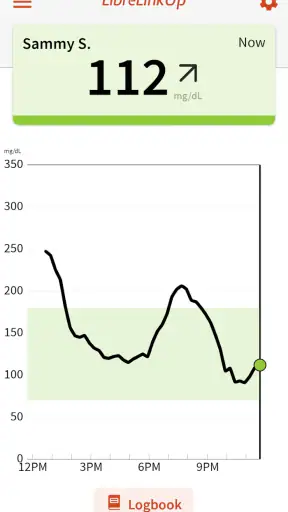
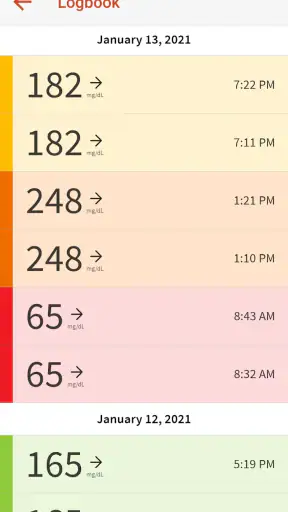
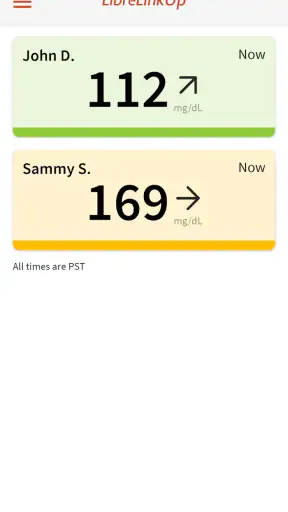
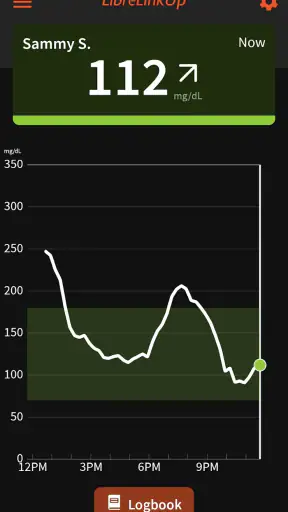

When glucose monitoring becomes part of a household routine, the hard part is not always the sensor itself. It can be knowing when another person needs attention without constantly asking them to unlock their phone, read a value aloud, or explain what is happening. I found LibreLinkUp most useful in that narrow but important role: it is a medical companion app for compatible continuous glucose monitors, designed to help another person stay informed about glucose information shared from the monitoring setup.
That makes it different from a general wellness tracker. I would not install it simply to count meals or create a personal health diary. Its value depends on an existing compatible monitoring arrangement and on another person choosing to share information with you. In my experience, that makes the app especially relevant for parents, partners, adult children, and trusted caregivers who need a practical way to coordinate around diabetes without turning every check-in into a phone call.
How LibreLinkUp fits into a shared household routine
A realistic example is a parent who wants to keep an eye on a child’s glucose information while the child is at school, staying with relatives, or sleeping. Another is an adult who helps an older family member but does not live in the same home. In both situations, the app can reduce the distance between the person wearing the compatible monitor and the person offering support. I see it as a window into shared information, not as a replacement for conversation, clinical advice, or the person’s own judgment.
The distinction matters. A shared view can help someone notice that a check-in may be worthwhile, but it does not automatically tell you why a reading changed or what action is appropriate. Meals, exercise, medication, illness, stress, and sensor circumstances can all affect glucose information. I would use the app to support a previously agreed routine, such as deciding when to call, when to ask how someone feels, or when to follow an existing care plan. I would not treat a notification or displayed value as permission to make a medical decision on someone else’s behalf.
For household use, the strongest benefit is continuity. The person with the monitor does not need to hand over their phone every time a trusted relative wants an update. The relative can check the companion app in the context of normal daily life, which is less disruptive than repeated messages. That can be reassuring during a commute, overnight, or while a family member is away from home. It also gives the household a shared reference point instead of relying on memory or incomplete verbal updates.
There is a trade-off, though. The app can make glucose information feel constantly available, and that can encourage over-checking. I think families should agree in advance who will look, what kinds of changes deserve a call, and when the person being monitored should be left alone. Without those boundaries, a helpful safety net can become a source of pressure for everyone involved.
The first setup question is compatibility and consent
LibreLinkUp is free, but “free” does not mean it works as a standalone glucose monitor. Its store summary identifies it as a companion for compatible continuous glucose monitors, so the first practical question is whether the monitoring system already in use supports this companion arrangement. I would check that before creating expectations among family members. Installing the app on a relative’s phone cannot, by itself, create access to glucose information.
The second question is consent. The person whose information is being shared should remain at the center of the arrangement. A parent may organize access for a child, while an adult may prefer to share only with a partner or one designated helper. The app is most useful when everyone understands who can see the information and why. I would avoid treating access as a household default simply because several people live together.
Account boundaries deserve particular attention on shared devices. If a tablet or phone is used by several people, I would make sure the companion account belongs to the intended viewer and is not casually passed around. A glucose view is health information, so convenience should not erase privacy. I also would not assume that every household member needs access. One reliable, trusted viewer may be more helpful than a large group of people who might misread a trend or create conflicting advice.
Before relying on the app, I would also have the primary user and the viewer test their normal routine together. That means confirming that the intended viewer can open the app, understands what the displayed information means at a basic level, and knows how the household plans to communicate. This test is more valuable than simply checking whether installation finished successfully. The real question is whether the app supports the agreed response when someone is busy, asleep, traveling, or temporarily without their phone.
What the app can improve in day-to-day coordination
In a good setup, LibreLinkUp turns separate moments into a coordinated routine. A caregiver can look before sending a message rather than asking a vague question such as “Are you okay?” A partner can recognize that a conversation may need to wait. A parent can combine the shared information with a child’s own report instead of relying on a single snapshot. These are small improvements, but they can make support feel calmer and less intrusive.
One useful habit is to treat the app as a prompt for a conversation, not the conversation itself. If something looks unusual, I would ask the person how they feel and whether they already know what is happening. That approach respects the wearer’s knowledge of their own body and avoids turning the viewer into a remote controller. It also prevents a common mistake: assuming that a visible number contains enough context to explain the situation.
Another practical insight is to agree on escalation levels. For example, the household might distinguish between information that can wait for a normal message, information that merits a phone call, and a situation in which the existing medical plan should be followed immediately. The exact thresholds and actions should come from the person’s care instructions, not from my interpretation of the app. LibreLinkUp can support the communication chain, but it should not be used to invent one.
This is where it compares favorably with ordinary messaging. A text such as “my glucose is fine” is quick, but it is dependent on someone remembering to send it and describing the situation accurately. A companion view can reduce that manual work. On the other hand, messaging remains better for context, reassurance, and questions. I would use LibreLinkUp for shared awareness and a phone call or message for human judgment.
It also differs from a personal diabetes log. A log is usually built around recording events for the individual, while this app’s household value comes from viewing information that is shared from a compatible monitoring setup. If your main goal is detailed personal journaling, meal notes, or long-term self-analysis, this is not the tool I would choose first. Its purpose is more focused: helping an authorized person stay connected to current monitoring information.
Trust, age, and the limits of shared visibility
The Everyone age rating makes the app broadly approachable from an age-classification perspective, but that should not be confused with independent medical suitability for every child. A young user may need an adult to manage the practical side of the arrangement, while an older child may need privacy and a gradually increasing role in decisions. The right balance depends on maturity, the care plan, and the family’s trust—not simply on whether the app can be installed.
For a child, I would present shared access as support rather than surveillance. The child should know which adult is viewing the information and what that adult will do with it. If the arrangement becomes a way to comment on every fluctuation, it may create anxiety or make the child feel watched instead of cared for. A clear agreement can help: the viewer checks for the agreed purpose, contacts the child calmly when needed, and avoids turning ordinary changes into criticism.
For an adult family member, the boundary is different. Living in the same home does not automatically mean that everyone should see health information. I would ask directly whether the person wants a partner, sibling, or caregiver involved, and I would revisit that choice if circumstances change. Shared-device households need extra care because a logged-in screen can expose information to someone who was never meant to receive it.
Trust also applies to interpretation. The viewer should know enough to recognize when to ask a question, but not assume that access makes them the medical authority. If several relatives are involved, I would nominate one main coordinator and make sure others understand their limited role. That reduces the risk of three people contacting the wearer at once, offering different suggestions, or creating confusion during an already stressful moment.
I would skip this app if the intended household arrangement is based on secret monitoring, constant control, or unclear responsibility. The technology may make sharing easier, but it cannot repair a lack of consent or communication. It is also a poor fit for someone who does not have a compatible continuous glucose monitoring setup, because the companion role is central to how the app works.
Everyday friction I would plan for
The app’s usefulness depends on more than the interface. The primary user’s monitoring setup, the viewer’s phone, account access, and ordinary connectivity all become part of the routine. If one link is unavailable, the viewer may not have the expected information. For that reason, I would never make the app the household’s only safety plan. Everyone should know what to do if the viewer cannot check, the wearer cannot respond, or the normal sharing arrangement is interrupted.
Notifications and attention can also become a source of friction. A viewer who receives frequent updates may begin reacting to every change, while a viewer who silences everything may miss the reason they were given access in the first place. I would start with the least intrusive routine that meets the care plan, then adjust it after the household has used the app in real situations. The goal is not maximum observation; it is dependable, proportionate support.
Another limitation is emotional rather than technical. Seeing a concerning change from a distance can make a caregiver feel helpless. The app may tell you that contact is worth considering, but it cannot provide the physical help, food, medication, or reassurance that might be needed. Families should discuss this before an urgent moment arrives. Knowing who is nearby and who should be called is just as important as having a viewer account.
I also recommend separating routine coordination from clinical record keeping. If a doctor or diabetes educator needs a fuller picture, the person should use the appropriate medical records and professional guidance. The companion app can be part of daily support, but I would not assume that a viewer’s observations replace formal documentation or a clinician’s interpretation.
What I noticed about the product’s maturity
Newyu, Inc is the developer behind this medical companion app. It was released on July 15, 2019, and the current version is 5.1.1. Those details suggest a product that has had time to become familiar to a substantial user base, although an established app still deserves a careful setup rather than blind trust. I would update it through the normal app store process and review the household arrangement whenever the monitoring system, phone, or caregiver changes.
Its public reception is solid rather than flawless, with an average rating of 4.1 from around 39 thousand ratings and roughly 1.2 thousand written reviews. More than a million people have installed it, so it is not an obscure experiment. I read those figures as evidence of practical usefulness alongside the reality that medical companion apps can be judged differently depending on a person’s device, care routine, expectations, and need for alerts.
The minimum operating-system requirement is iOS 11, which keeps the app accessible to many older Apple devices. Even so, I would check the actual phone used by the viewer before promising a family member that it will work on a spare device. A phone that technically meets the requirement may still be inconvenient if its battery, notification behavior, or everyday availability is poor. In a shared household, reliability often depends more on the chosen device than on the installation itself.
Because the app is free and rated for Everyone, the barrier to trying it is low. The meaningful cost is attention: deciding who should have access, agreeing how information will be used, and practicing the response routine. That is why I would judge it less like a casual download and more like a small part of a household care system.
Who should use it, and who should choose something else
I would recommend LibreLinkUp to a trusted person who needs shared visibility into a compatible continuous glucose monitoring arrangement. It makes the most sense when the wearer wants support but does not want to provide manual updates all day. Parents coordinating with another caregiver, partners sharing responsibility, and relatives helping from another location are the clearest use cases.
I would be more cautious for a household that wants a full diabetes-management platform. If you need extensive personal records, detailed lifestyle analysis, or a tool designed primarily around the wearer’s own data entry, a dedicated diabetes diary or the main monitoring app may be a better match. The companion app’s strength is not breadth; it is the focused connection between the monitoring user and a trusted viewer.
I would also choose a different approach if the family cannot agree on privacy boundaries. No app can make shared health information comfortable when the person being monitored feels pressured or the viewers disagree about their role. In that situation, a direct conversation with the care team and a simpler communication plan may be more appropriate than adding another screen to the household.
For a user deciding whether to install it, my practical advice is to begin with one clearly identified viewer, one agreed purpose, and one backup communication method. Confirm that the primary user understands the sharing arrangement. Test the routine during an ordinary day, not only when everyone is calm at home. Then ask whether the app reduced unnecessary messages and improved support, or whether it caused more checking and worry. That answer will tell you more than the download itself.
My household verdict
LibreLinkUp is a focused medical companion rather than a complete diabetes-management solution. I like it because it addresses a real household problem: staying connected to glucose-monitoring information without requiring the wearer to report every update manually. Used with consent and a clear response plan, it can make support more timely while preserving the wearer’s independence.
Its limitations are equally important. It depends on a compatible monitoring setup, shared access must be handled carefully, and displayed information still needs context. It cannot replace the wearer’s awareness, professional care, or a backup plan for moments when technology or communication fails. Families should also resist turning visibility into surveillance.
My recommendation is simple: use LibreLinkUp when shared awareness is the missing piece in an already organized care routine. For a trusted household viewer, it can be genuinely useful and reassuring. For someone seeking a personal tracker, a complete medical record, or automatic clinical decision-making, it is the wrong tool. In the right family arrangement, though, its focused design is precisely what makes it worthwhile.
As a free app from Newyu, Inc with an Everyone rating and broad adoption, it is easy to consider, but the best results come from thoughtful boundaries rather than from installing it on every available device. I would keep the access list small, agree on how to respond, and treat the app as a bridge between people—not as a substitute for trust, conversation, or care.


